
Professional Cheque Printing Software

Print Cheques Accurately. Manage Everything Securely.

Create bank-specific cheque templates, manage payees, calibrate printer alignment, control users, and maintain complete cheque-printing history from one secure application.

Accurate cheque alignment
Multiple banks and templates
Live preview before printing
Secure role-based access
Complete cheque printing history
ChequePilot professional cheque printing application with cheque form and live preview
Multiple Bank Templates
Accurate Printer Calibration
Live Cheque Preview
User Access Control
Searchable Print History
Secure Login Session
Simple 4-Step Workflow

How ChequePilot Works

Set up your bank and cheque template once, then prepare and print accurate cheques in a few simple steps.

01Setup

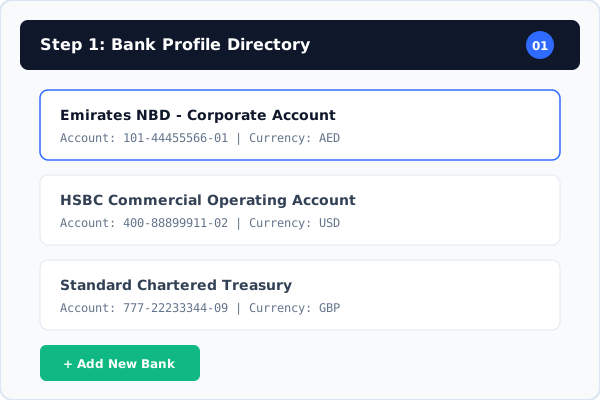
Add a Bank Account

Add and organize the bank accounts used for cheque printing across your corporate entities.

Step 01 Details
02Design

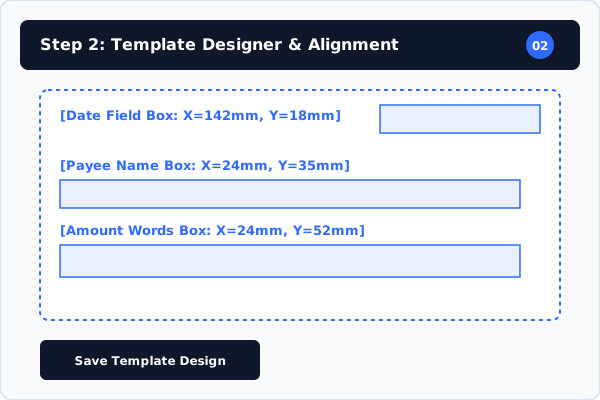
Create a Cheque Template

Upload a cheque image, confirm its actual physical dimensions in millimeters, and position required text fields.

Step 02 Details
03Form Entry

Enter Payment Details

Choose the bank and template, then enter the payee, amount, date, cheque number, and optional reference memo.

Step 03 Details
04Output

Preview, Calibrate and Print

Review the full cheque, apply printer calibration offsets where required, and print or save the record.

Step 04 Details
Step 01 Interactive Preview

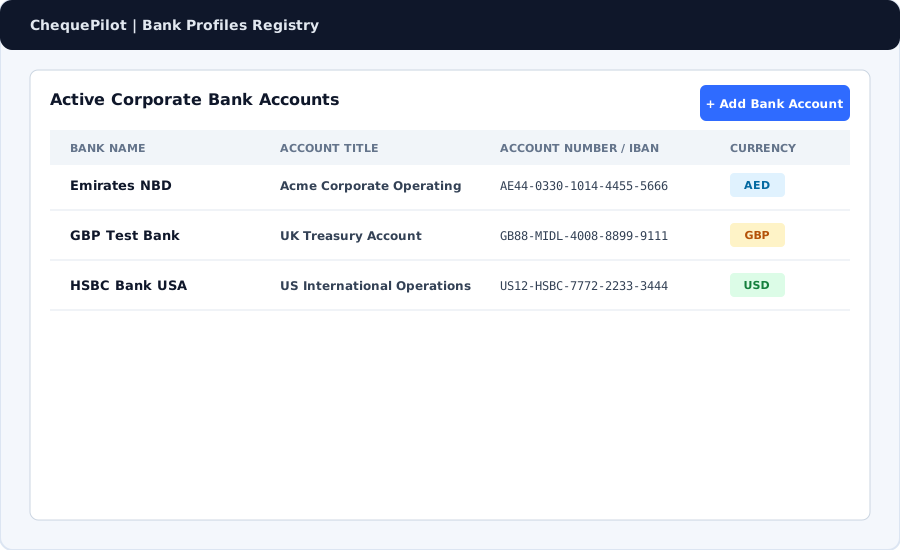
Add a Bank Account

Add and organize the bank accounts used for cheque printing across your corporate entities.

Add a Bank Account
Comprehensive Feature Set

Everything You Need for Professional Cheque Printing

Engineered specifically for business desks, accounts departments, and finance administration.

Designer

Cheque Template Editor

Upload cheque background images, define actual physical dimensions in millimeters, and position printable fields accurately.

Learn capability
WYSIWYG

Live Cheque Preview

Review cheque content, font styling, line spacing, crossing marks, and field placement before physical printing.

Learn capability
Calibration

Printer Calibration

Adjust X and Y printer offsets in millimeters to ensure precise text alignment on physical cheque paper.

Learn capability
Multi-Bank

Bank Account Management

Organize multiple company bank accounts, IBANs, account titles, and assign default cheque templates.

Learn capability
Directory

Payee Management

Save and reuse frequently used vendor, contractor, and employee payee information for fast auto-fill data entry.

Learn capability
Auditing

Print History

Maintain searchable audit logs of completed cheque prints, including timestamps, payee names, cheque numbers, and currency totals.

Learn capability
Workflow

Draft Workflow

Save incomplete cheque records as drafts to review, edit, or authorize before final physical execution.

Learn capability
Security

User and Role Management

Control administrative permissions and team member access with Super Admin, Admin, and User roles.

Learn capability
Interactive Product Tour

Everything You Need to Print Cheques Professionally

Explore the key interfaces and features inside ChequePilot designed for business productivity.

Print Cheque Feature Spotlight

Streamlined Cheque Entry & Instant Preview

Enter payee, date, numeric amount, and memo details with automatic currency words conversion and live canvas preview.

Auto-sync currency units (Pounds, Dirhams, Dollars, Rupees)
Automatic number-to-words spelling compiler
Interactive live cheque layout canvas
1-click Print and Save transaction logging
Streamlined Cheque Entry & Instant Preview
Video Guides & Tutorials

Learn ChequePilot Step by Step

Watch short tutorials to set up your account, create templates, calibrate your printer, and print cheques confidently.

1. Getting Started with ChequePilot
Coming Soon3 mins
Getting Started

1. Getting Started with ChequePilot

A quick overview of the application and the recommended setup process for new users.

Watch Preview
2. Adding Your First Bank Account
Coming Soon4 mins
Bank Setup

2. Adding Your First Bank Account

Learn how to add bank details, currencies, and account numbers to your workspace profile.

Watch Preview
3. Creating a Cheque Template
Coming Soon5 mins
Template Designer

3. Creating a Cheque Template

Step-by-step guide to uploading cheque images and configuring bank-specific layouts.

Watch Preview
4. Setting the Actual Cheque Size
Coming Soon3 mins
Template Designer

4. Setting the Actual Cheque Size

How to measure physical cheque leaves and set precise width and height in millimeters.

Watch Preview
5. Positioning Cheque Fields
Coming Soon4 mins
Template Designer

5. Positioning Cheque Fields

Drag and drop Date, Payee, Amount in Figures, and Amount in Words boxes onto your canvas.

Watch Preview
6. Adding Payees
Coming Soon3 mins
Payees

6. Adding Payees

Organize frequent vendors and payees in your address book for rapid auto-complete.

Watch Preview
Business Productivity & Value

Designed for Business Efficiency & Accuracy

Focus on business outcomes and operational reliability for corporate accounts desks.

Reduce Manual Writing Errors

Automated number-to-words currency compilation prevents spelling mistakes and invalid figures.

Standardize Cheque Preparation

Maintain uniform typography, line spacing, and crossing mark formats across company accounts.

Improve Field Alignment

Fine millimeter printer offset adjustments keep text precisely inside pre-printed cheque leaf lines.

Reuse Bank-Specific Templates

Save individual template definitions for each bank format used by your organization.

Save Frequently Used Payees

Speed up vendor payments and monthly payroll disbursements with reusable payee directory records.

Maintain Printing History

Keep an organized, searchable historical ledger of every printed, saved, or voided cheque record.

Control User Access

Restrict administrative settings to authorized personnel while enabling user printing tasks.

Reduce Repetitive Data Entry

Auto-fill payee details, bank account numbers, and currency titles automatically.

Improve Operational Consistency

Standardize cheque printing routines across administrative locations and corporate desks.

Printer Calibration Engine

Designed for Accurate Real-World Printing

Engineered to work reliably with standard desktop laser and inkjet physical paper feeders.

Actual Cheque Dimensions

Configure exact cheque leaf width and height in millimeters matching your physical cheque book.

Bank-Specific Templates

Save custom template definitions for each bank account and cheque format used in your business.

Live Preview Before Printing

Verify field locations, font weights, and crossing marks in real-time on screen as you type.

X and Y Printer Calibration

Adjust horizontal and vertical print offset margins in millimeter increments to correct paper tray feeder drift.

Consistent Field Positions

Lock text coordinates for Date, Payee, Amount in Figures, Amount in Words, and Memos.

Saved Template Definitions

Reuse verified layout configurations across corporate sessions without re-measuring paper.

Printer Alignment Offsets
Status: CALIBRATED
HORIZONTAL OFFSET (X)+0.50 mmCorrects left/right tray feed
VERTICAL OFFSET (Y)-1.20 mmCorrects top/bottom paper margin
Verified alignment state for laser & inkjet physical printers
Security & Controls

Secure Access and Better Control

Built with verified authentication, role-based authorization, and protected application routes.

Authenticated User Access

Secure session token authentication with encrypted password credentials.

Role-Based Authorization

Distinct Super Admin, Admin, and User privileges to manage application capabilities.

Controlled Permissions

Restrict system configuration, user creation, and bank management to administrators.

User Management

Activate, deactivate, or manage password controls for authorized corporate users.

Session-Based Access

Protected application routes ensure unauthenticated requests are redirected safely to login.

Cheque Printing History

Searchable transaction records with execution timestamps logged in local machine time.

Target Audience

Built for Businesses That Print Cheques Regularly

ChequePilot provides a dedicated workspace for companies managing physical cheque disbursements.

Small and Medium Businesses

Streamline payment preparation and maintain professional cheque records with minimal operational overhead.

Accounts Departments

Eliminate manual handwriting errors and accelerate vendor and payroll disbursement routines.

Administrative Teams

Standardize cheque preparation procedures across administrative locations and company desks.

Trading Companies

Manage multi-currency bank profiles and maintain segregated printing records for commercial trading.

Service Companies

Handle routine client refunds, vendor payments, and operational expense cheques accurately.

Property & Facility Management

Manage cheque templates for multiple owner accounts and property management banks.

Multi-Company Operations

Handle segregated bank profiles and printing records across subsidiary business entities.

Organizations with Multiple Banks

Switch between different bank cheque layouts seamlessly without reconfiguring software settings.

Frequently Asked Questions

Frequently Asked Questions

Everything you need to know about ChequePilot.

ChequePilot is a professional cheque printing and management software application that allows businesses to create bank-specific cheque templates, enter payment details, preview layouts, calibrate printer offsets, and maintain searchable print records.
Professional Cheque Printing Workspace

Ready to Simplify Your Cheque Printing?

Create accurate cheque templates, manage payment details, and maintain print records from one professional workspace.